It’s been 2 years.
I remember very clearly that day.
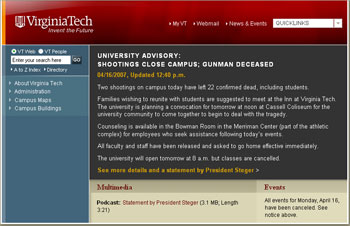
I only learned about the tragedy around 11AM that morning. I was unplugged to work on a project, and it’s just when I checked my email and the email listservs that I saw a message referring to something terrible going on at Virginia Tech. I checked VT website and decided to share the info and a screenshot with this blog’s readers right away.
There was no Twitter at that time, or more accurately it didn’t have the following it now has. I can’t stop thinking that if the microblogging platform had been around, maybe, some lives could have been saved.
The Virginia Tech Tragedy marked a day in American and higher ed history. That day, Mike Dame, Director of Web Communications at VT and his team wrote an important page in the higher ed web communication book. They literally wrote the manual to handle web communications in such a terrible crisis.
In the following day, they were criticized – as the institution was – mainly by mainstream media and experts for failing to communicate… But, at the end of the day, Mike and his team did a great work.
2 years ago, I kept track of the homepage changes on a post to compile an archive that could offer an account of the great work of Mike’s team.
When things settled down a bit, I told Mike that he should tell the community how things went and how his team handled them. I worked with Mike on a webinar (that allowed us to raise $4,300 for the Hokie Fund of Virginia Tech) that became a famous presentation given later that year at many higher ed conferences.
If you didn’t get a chance to watch that presentation yet, here’s your chance. Now that Mike has left higher education to work in healthcare, I think it’s time to release this presentation to our community for free.
From the Inside Out: Lessons Learned in Crisis Web Communications after the Virginia Tech Tragedy (69 minutes – recorded on July 10, 2007)
Michael Dame, Director of Web Communications at Virginia Tech, will provide an insider look and analysis of his institution’s Web communications after the tragedy, helping every institution understand what happened and prepare for the unthinkable and the unplanned.
Streaming file link
Downloading file link
You’ll need to use “hokie” as the password to get to these files and you might have to use Internet Explorer (sorry it’s an old file and Firefox doesn’t seem to play well with this version of WebEx recording)
You can also have a look at what I’ve written for the past 2 years about the VT Tragedy and the topic of crisis communication.
And, to honor the memory of the victims, why not tell us now what you’ve learned or have changed on your campus in terms of emergency notifications or security by posting a comment.
That’s what I’ve learned this morning by reading “Emergency Alerts via Facebook and MySpace Are New Ways to Reach Students,” an article written by Jeffrey Young from the Chronicle of Higher Education.
A group of researchers at the [University of Maryland at College Park] is also working to build a prototype of a homemade social network for the university’s Web site designed for use in emergency situations. The project is an outgrowth of work by Ben Shneiderman, a professor of computer science at the university, and Jennifer J. Preece, dean of the university’s College of Information Studies. They published an article in Science last year proposing that local governments develop social networks to supplement 911 emergency hotlines.
Mr. Shneiderman said he got the idea after typing “911″ into Google and getting no useful results. “I said, “Something is wrong here—I think of the Web as my source of communication.”
Now a graduate student at Maryland, Philip Fei Wu, is building a prototype for university use. “We hope to create a platform to allow students to communicate, to exchange ideas, to comment on ideas” in an emergency, Mr. Wu said in an interview.
As I said in the comment I posted on Wired Campus, the Chronicle’s blog, I don’t think a social networking website designed to be used just for emergencies can do the job.
It makes sense to incorporate the features in the daily activities of its potential users, but they won’t probably remember to log in if something happens.
What do YOU think?
This morning, I received two emails asking if it was still possible to register for the May 7 webinar about crisis/emergency websites presented by Mike Dame from Virginia Tech (the initial registration deadline was yesterday).
As a result, I decided to postpone the registration deadline until this Friday (May 2) at 9PM ET. If you want to learn more on why and how to design a crisis/emergency web template for your institution, this webinar will help.
Institutions registered for this series include:
For more information and to register online, just go to www.higheredexperts.com/911website
And, if you have any problems or issues, just send me an email at karine@collegewebeditor.com
At Virginia Tech, Mike Dame and his team have been working on this day of remembrance on the Web for a while and the result is another beautiful piece of Web design on the homepage:
A dedicated website has also been created for the event at www.remembrance.vt.edu:
This is how Virginia Tech remembers, how do you? Share with the rest of us by posting a comment.
My second UB column for 2008 is now available in the April issue as well as online: “It’s 2008: Is Your 911 Website Ready?”
When I wrote this article, my goal was to give you a good piece of third-party validation (hey, you can even print the article so it looks like it was xeroxed from the magazine and share it with your favorite VP and president) to get to work on your crisis web template.
You’ll find in this column 8 tips from several of your peers (including Mike Dame of Virginia Tech) to get you started.
After interviewing Mike for this article, I thought that this would also make a great topic for a webinar for Higher Ed Experts. Mike agreed and will present this special webinar on May 7, 2008:
911 Website: How to design your crisis/emergency web template
Michael Dame, Director of Web Communications at Virginia Tech, will explain why every higher education institution should prepare a crisis web template and how Virginia Tech’s made a big difference on April 16, 2007. He will also walk you through the steps necessary to build a best-of-breed crisis website and share a basic coded template to get you started
For more information and to register (by April 28, 2008), please visit www.higheredexperts.com/911website
By the way, if you are a University Business reader who has just discovered collegewebeditor.com, welcome! Don’t forget to subscribe to this blog via RSS or email.
Would you share your crisis ‘lite’ website homepage with your colleagues in higher education?
Since the Virginia Tech Tragedy, we all have been building/updating the web template to be used in case of a crisis or an emergency.
By nature, these web templates can’t be easily shared among different institutions. You don’t want the general public to stumble on these by mistake.
So, I got an idea that I shared with the members of Higher Ed Experts this morning.
This online community is only open to people working in universities and colleges (not a member yet, sign up at www.higheredexperts.com/register), so it would be very easy to create a password-protected gallery listing crisis/emergency web templates from different institutions.
The gallery will only be viewable by registered members. The goal is to build a useful tool for everybody looking for some benchmarking data.
Duke University and Kingsborough Community College (CUNY) have already agreed to share their web page template.
If you’d like to and can share a link to yours (I could also host a copy of your HTML files at www.higheredexperts.com – again only available to members), please send me an email at karine@higheredexperts.com.
Even if you don’t take the time to read my last article about crisis communication (although you should), don’t ignore these 5 basic tips and share them with folks in charge of crisis communication at your institution:
- Make sure the chief communication officer of your institution is part of your emergency team.
- Include in your crisis plan your institution response to different possible scenarios. Define the type of communication channels to be use for the different situations and prepare the notification templates for each. In case of a crisis, you’ll be able to update and send these templates in minutes.
- Practice, practice, practice. Train your emergency team to assess, evaluate and make decisions. Review and edit your crisis plan with what you learn from your drills.
- If a crisis happens, send your alert notifications via several communication channels (phone, cell phone, email, text-messages, loud speaker, PA systems, etc.) and post the notification on the homepage of your website.
- Use your website as the main hub for your communications with your campus community, parents, media representatives and the rest of the world throughout and after the crisis.
As announced by Andrea Schwandt-Arbogast on her blog earlier this week, Humboldt State University tested its emergency homepage yesterday morning for about 15 minutes:
I have developed two emergency templates— one for low-level emergencies such as power outages, tsunami warnings for the county (campus itself is out of tsunami range), etc, and one for high-level emergencies such as campus shootings, major earthquakes and the like.
The low-level emergency template will be used tomorrow, and retains HSU marketing messages and most functionality. The high-level template removes all images and marketing, as well at most functionality, in anticipation of high server loads. Folks from the Web Office and from Public Affairs have the ability to switch the main site to one of these emergency templates and post emergency messages.
This online drill was announced on the homepage via a special red button:

At 10:45 am PT, the homepage switched to its emergency state while the tower bell rang on campus as part of the drill.

The online part of this drill allowed HSU to practice, test its emergency homepage and use the website communicate effectively what all that ringing was about.
Smart move, don’t you think?
September isn’t over yet, but the month has already seen 2 shooting-related crises:
The good news is that lessons learned after the tragedy at Virginia Tech last April seem to have been implemented in both cases.
As I mentioned before, I spent time this summer researching and writing an article about crisis communication for the October issue of University Affairs, Canada’s higher ed magazine.
Now available online, the article titled “Crisis Communications 2.0″ draws information from Canadian and American sources such as Dawson College and Virginia Tech among others.
For this piece, I also tried to interview somebody at Montreal’s Ecole Polytechnique where 14 women were killed and 13 injured by a single gunman back in 1989, but my request was declined as the institution still doesn’t give any interview about the topic almost 20 years after the facts.
University Affairs being a bilingual publication, the article has been translated in French as well. The French version is also available online.
Lately, I’ve read more and more negative comments about SecondLife. Many inside and outside of higher education have questioned the return on investment of SL campuses for universities and colleges as Jeff Young from the Chronicle of Higher Ed wrote a few days ago in the Campus Wired Blog:
More than 100 colleges have set up some kind of presence in Second Life, according to officials at Linden Lab, the company that runs the environment. But are those campuses attracting enough visitors to make the investments worth it? Earlier this year we published an article and a video tour of Case Western Reserve University’s virtual campus, which it used to give tours to prospective students. But during more than a month in which Case Western students were on hand to show folks around, only 40 people wandered by, according to college officials.
Perhaps that’s enough to make it worth the effort — they did get some news-media coverage, after all. Are any college officials working in Second Life starting to have second thoughts?
While I don’t think institutions should bet all their marketing (or academic) dollars on SecondLife, I definitely think SL offers a very interesting and rich platform for distance learning, but also for any types of learning that can’t take place easily in the real world.
As regular readers know I’ve been following the latest developments in crisis communication for a while. I just wrapped up a feature article about the topic for University Affairs to be published in the October issue of this Canadian magazine.
Thanks to UA editor Peggy Berkowitz, the article will also include some reporting about an emergency training exercise that was conducted on August 15 at The University of Western Ontario – that was 2 weeks after I submitted my final draft.
At Western, the exercise had some consequences for the campus community: University Drive was closed during several hours.
This is one of the reasons why these drills can’t be run too often on real campuses.
But, what about on virtual campuses?
If your campus has already been replicated in SecondLife, it wouldn’t take much (ok, you’d have to train your emergency team to move around in SL) to schedule these trainings there.
I knew emergency response training was already taking place in SL when I started to write this post, but I stumbled upon a great initiative by Idaho State University while searching for a couple of examples.
The Idaho Bioterrorism Awareness and Preparedness Program (IBAPP) and the Institute of Rural Health at Idaho State University launched a few months ago Play2Train, a virtual “playground” to run emergency response exercises:
This virtual environment spreads over two islands Asterix and Obelix (65536 x 2 sq. meters), with one island dedicated to a virtual town and the other a virtual hospital. The design of this virtual environment is influenced by dioramas frequently used by emergency services to support their tabletop exercises. A diorama is a partially three dimensional full-size replica or scale model of a landscape typically showing historical events, nature scenes, cityscapes, etc. for purposes of education or entertainment
What they are doing is really great (I’m embedding below the 16-minute video where Ramesh Ramloll, the project manager of Play2Train, explains what it is and what it can do):
Now, if it were possible to “unpack” — on any SL university campus — special crisis/emergency scenarios leveraging what has been done on the Play2Train islands, this would provide the next best thing to these emergency drills that have become so crucial for institutions after the Virginia Tech Tragedy.
Don’t you think so?
Just a quick post to let everybody know that I’ve made a $4,300 online donation to the Virginia Tech Hokie Spirit Scholarship Fund in the name of the higher ed community.
The funds were raised via a $100-per-attendee donation made by people who attended Crisis Communication 2.0 Week a few weeks ago.
Attendees paid $250 instead of the discounted rate of $150 (for Higher Ed Experts’ members) for the 3-webinar series featuring Mike Dame, web communications director at Virginia Tech.